A larger customer is ready to sign. Then their security team sends a questionnaire, often a spreadsheet with more than a hundred questions. The founder looks for help and finds compliance platforms, scanners, audit firms and consultants. Each one says it is the answer. It is hard to tell which of them you need now and which can wait.
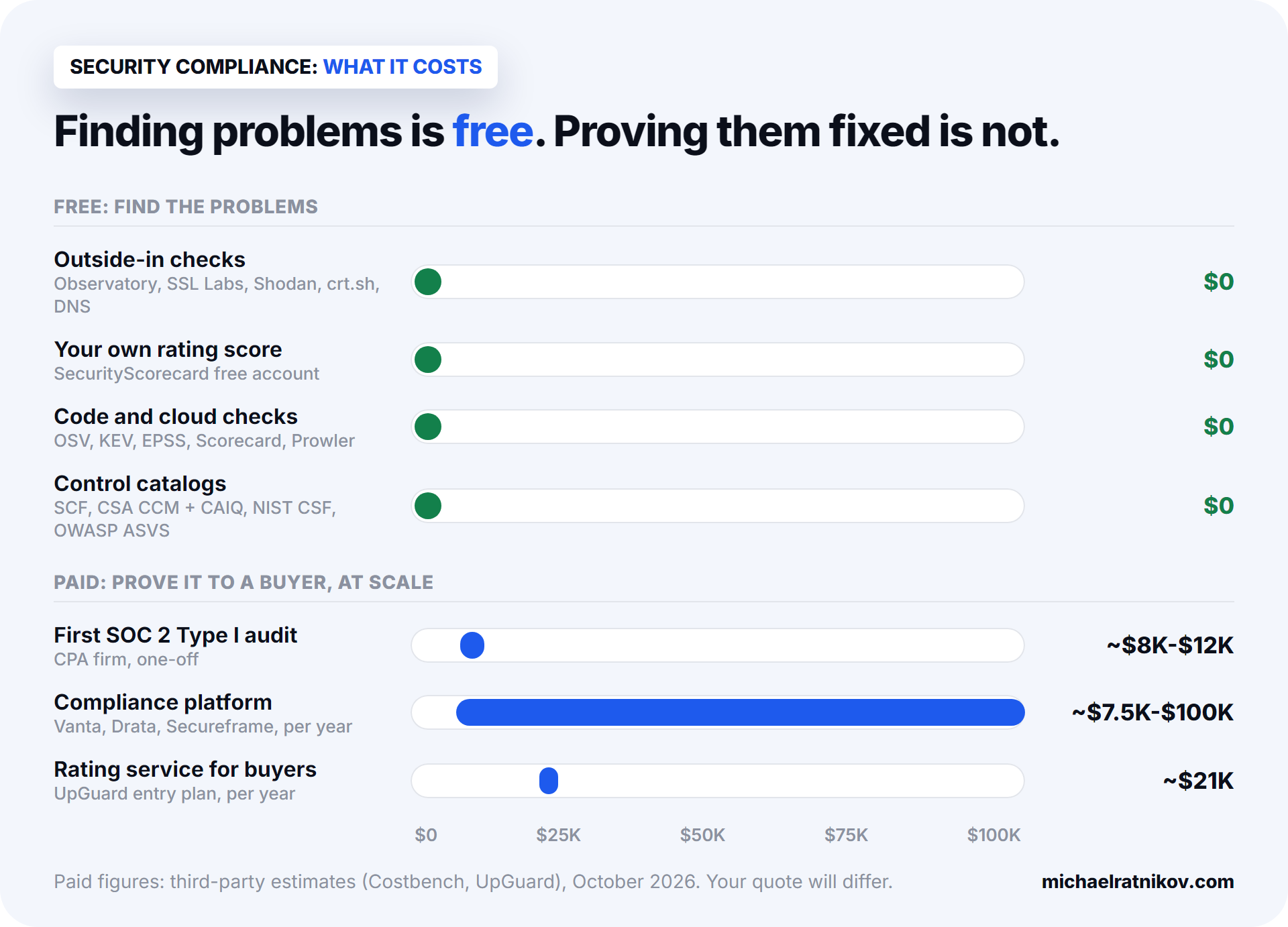
There are many security compliance tools for startups, and the price range is wide. A compliance platform costs from about $7,500 to $100,000 a year.1 The checks that find most problems cost nothing. The hard part is knowing which layer you need for this deadline.
I know these layers from real work. I was the lead architect of an insurance CRM that passed SOC 2 and HIPAA audits. For this article, I also ran the free checks on my own internal CRM. Its website security settings got a D.
The short version, if you read only one part:
- Start from the deadline, not from "compliance". Write down what is coming, who is asking and when. For example: "a bank sends us a security questionnaire, due in six weeks".
- Prepare only for what that deadline needs. Usually that is one to three items, for example the questionnaire plus GDPR. Other frameworksframework: a named set of security or privacy requirements, such as SOC 2, ISO 27001 or GDPR. Some are laws, some are standards, some come from buyers. can wait until a buyer asks for them.
- Run the free outside checks first. They show what your buyer's security team can see about you without asking.
- Then check the inside of the system. Can you restore a backup? Who gets alerts? Do you own the code and the accounts?
- Buy a compliance platform and an audit only when a buyer asks for an audit report. Before that, the money is better spent on fixing the system.
A map of security compliance in six layers
There is no official way to split this market. I sort it into six layers: rules, checklists, checkers, platforms, auditors and raters. This is my own map, not a standard. But it helps, because most confusion comes from mixing the layers. Here is how they fit together.
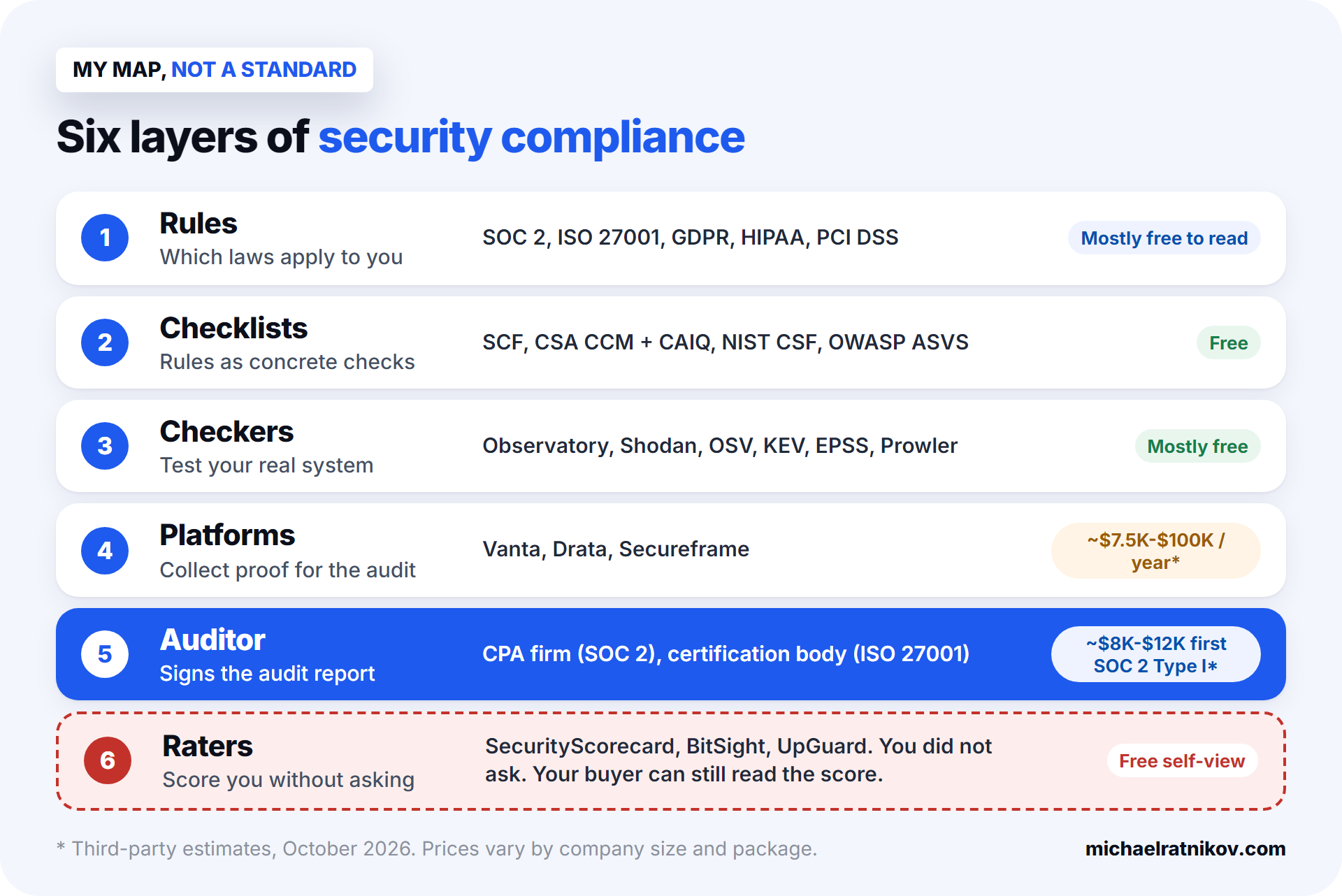
- Rules. Laws and standards such as SOC 2, ISO 27001, GDPR and HIPAA. They say what you must achieve, for example "control who can access customer data". They do not say how.
- Checklists. Lists that turn each rule into concrete checks you can tick, like "all admin accounts use MFAMFA (multi-factor authentication): logging in with a second step, such as a code from a phone app, in addition to the password.".
- Checkers. Tools that test your real system: your website, your code, your cloud account. They show whether each check is really met.
- Platforms. Products like Vanta and Drata that collect evidenceevidence: proof that a security control works, for example screenshots, exported settings, logs or signed policies. Auditors and buyers ask for it. every day, so you can show an auditor that the checks worked over months.
- Auditors. An independent firm that reviews the evidence and signs a SOC 2 report or issues an ISO certificate.
- Raters. Companies that score your security from public data, without asking you. Your buyer may read that score.
Layer 1: which rules apply to you
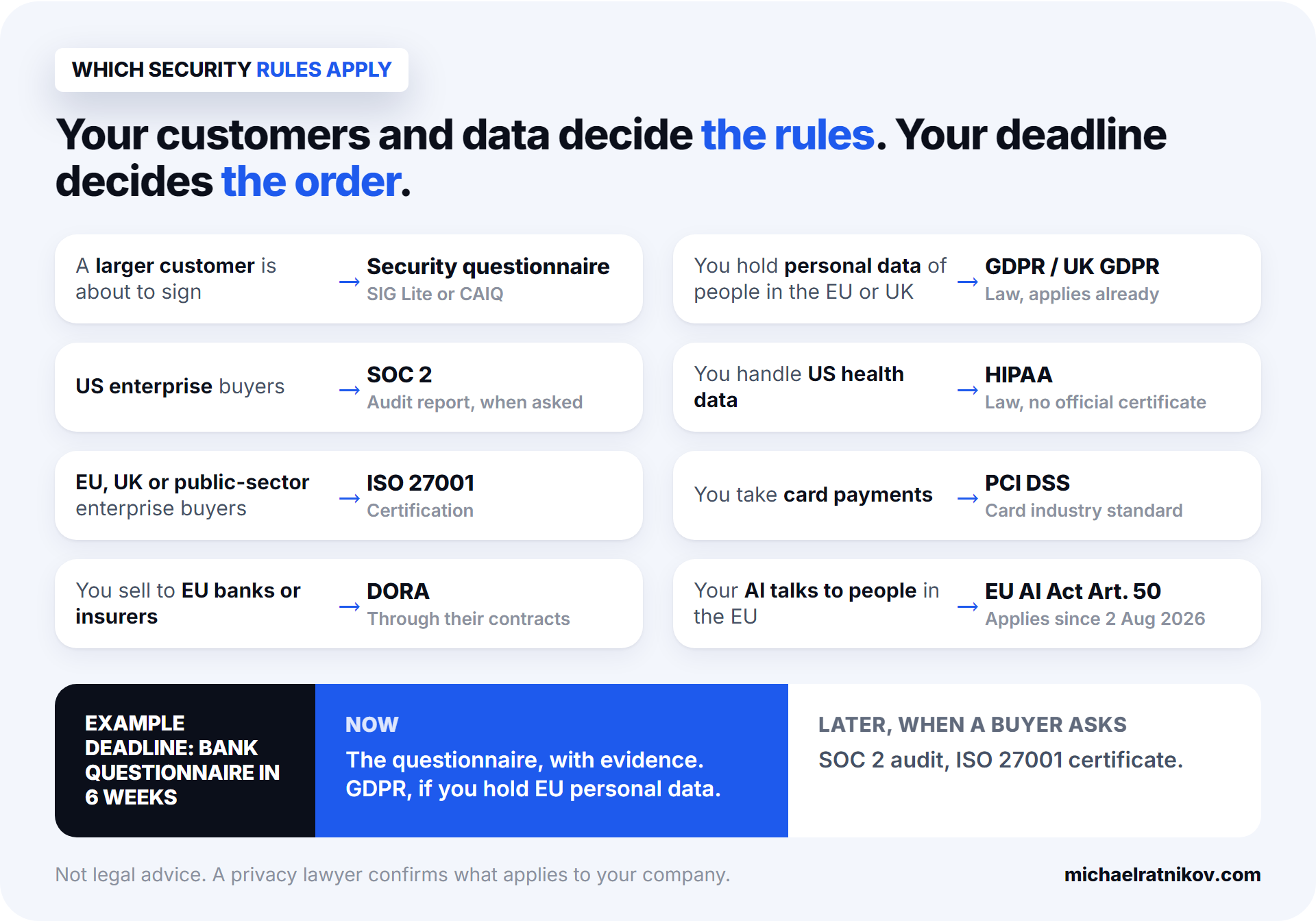
Three facts decide which security rules apply to you: where your customers are, who buys from you, and what data you hold. The deadline decides what comes first.
| Rule | Who usually asks for it | When it usually matters |
|---|---|---|
| Security questionnaire (SIG Lite, CAIQ) | Larger customers | Before the contract is signed |
| SOC 2SOC 2: a US audit report on your security controls, issued by a licensed CPA firm. Type I checks the design at one point in time. Type II checks that the controls worked over a period, usually several months. | Mostly US enterprise buyers | When a buyer asks for "your SOC 2 report" |
| ISO 27001 | Often EU, UK and public-sector buyers | When a European enterprise customer or a tender requires it |
| GDPR / UK GDPR | Regulators, EU and UK buyers, investors | You hold personal data of people in the EU or UK. It already applies |
| HIPAA | US healthcare customers | You handle US health data |
| PCI DSS | Your payment provider or bank | You take card payments |
Some products meet more rules:
- DORA, if you sell to EU banks or insurers.
- EU AI Act Article 50, if your AI talks to people in the EU.
- NAIC AI Model Bulletin, if you sell AI features to US insurers.
Two points are easy to miss.
First, a questionnaire is not a SOC 2 audit. A vendor security questionnaire is the buyer's own check. You fill it in yourself, and you attach evidence. A SOC 2 report is an independent audit that takes months and costs thousands of dollars. For a first deal, the questionnaire is often all the buyer needs. Ask the buyer directly: "Do you need a SOC 2 report, or is the questionnaire enough?"
Second, you do not have to prepare for everything at once. A founder with EU users, a US bank as a customer and an AI chatbot can find six rows that seem to apply. Trying to work on all six at the same time usually means nothing gets finished before the deadline. Ask: "What does this buyer need from me by this date?" Usually the answer is one to three items. The rest goes on a list for later.
Layer 2: the checklists are free
A checklist turns a framework into concrete things to check, and the best checklists are free. SOC 2 does not say "turn on MFA". It asks you to control who can access your systems. A control catalogcontrol catalog: a structured list of specific security requirements (controls), each with an ID, often mapped to the frameworks that require it. turns that into a list you can follow.
- Secure Controls Framework (SCF) maps one list of controls to more than 200 laws and frameworks. So one piece of work, like turning on MFA for all admins, can count for several frameworks at once.2
- CSA Cloud Controls Matrix and CAIQ cover cloud software. Some buyers send CAIQ itself as their questionnaire, so it is good practice material.3
What a checklist cannot do is tell you whether a requirement is really met. A checklist says "test your backups". It cannot know that nobody has ever tried to restore yours.
Layer 3: the best free security compliance tools for startups
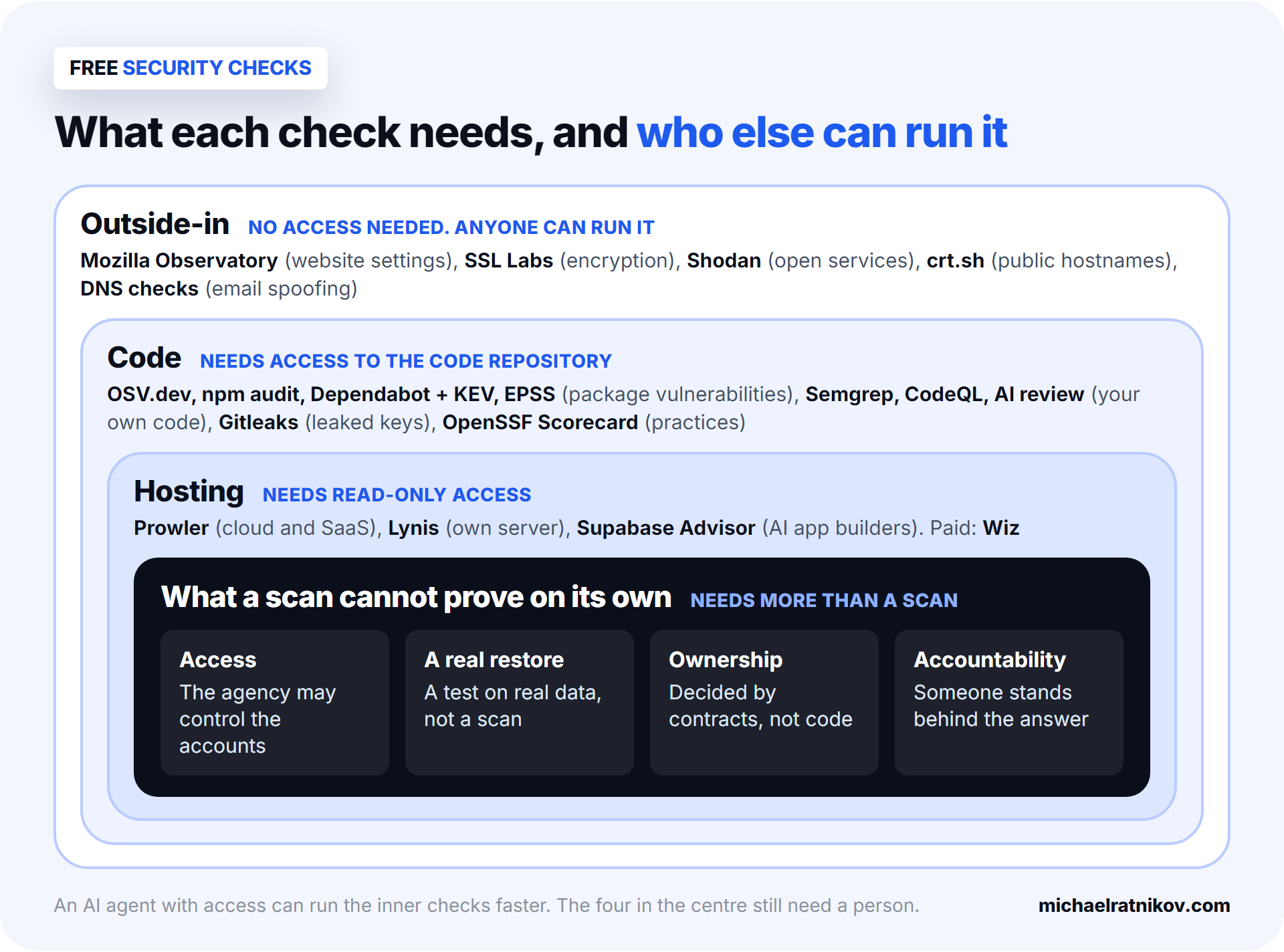
Checkers test your real system, and the best ones are free. They fall into three groups, by how much access they need.
- Outside-in checks need no access. Your buyer's security team can run all of them in a few minutes.
- Mozilla HTTP Observatory grades your website security settings.
- SSL Labs grades your encryption.
- Shodan shows which services are open to the internet.
- MXToolbox checks whether someone can send email in your name.
- Code checks need access to the code. Free tools like Semgrep and Gitleaks find dangerous patterns and passwords left in the code. Be careful with their labels: a "critical" warning is not always a critical risk in your product.
- Hosting checks need read-only access to where the app runs. Prowler checks cloud accounts like AWS, Azure, Google Cloud and Vercel. For apps built with Lovable, Bolt or Replit, the setting that matters most is usually the database access rules.
I ran the outside-in checks on my own CRM:
- Encryption: grade A.
- Website security settings: grade D, 30 out of 100.
- A forgotten service: an old demo app was still visible from the internet.
- Email: my domain had no email sender protection.
None of it was a disaster. All of it was visible to anyone who looked, and all of it was quick to fix.
Some questions no scan can answer on its own:
- Can your backups really be restored?
- Who gets an alert at 3 am?
- Does deleting a customer delete all their data?
- Who owns the code, the cloud account and the domain? Sometimes it is the agency, not you.
An AI agent can help with these if you give it access. But someone has to run a real restore, and someone has to take responsibility for the answer you give your buyer.
Layer 4: compliance platforms
Compliance platforms, also called compliance automation tools, collect evidence for an audit every day, for months. They are worth the money once a buyer asks for an audit report, not before. Vanta, Drata and Secureframe are the best known. What they do:
- Connect to your cloud and code, and collect evidence automatically.
- Give you policy templates.
- Connect you with audit firms.
What they cost, according to third-party comparison sites:1
- Vanta: roughly $10,000 to $80,000 a year.
- Drata: roughly $15,000 to $100,000 a year.
- Secureframe: from about $7,500 a year.
- The audit is a separate bill: about $8,000 to $12,000 for a first SOC 2 Type I audit.
There are also open-source options, such as Comp AI and Probo.4
What a platform does not do:
- It does not advise you on timing.
- It does not check how your application handles data inside.
- It does not fix anything. It shows what is missing, and your developers still do the work.
Layer 5: the people who sign
For a small software company, buyers usually accept proof from these people:
- SOC 2: a licensed CPA firmCPA firm: a US accounting firm with licensed Certified Public Accountants. Only such firms can issue a SOC 2 report. signs the report.
- ISO 27001: an accredited certification body issues the certificate.
- GDPR: there is no required certificate. A privacy lawyer reviews your legal basis and contracts.
HIPAA has no official certificate either. A "HIPAA certified" badge is a label someone created. Be careful with anyone who promises "compliant in two weeks".
Layer 6: the raters who already score you
Rating companies give security scores to millions of companies, whether they asked or not:
Large companies pay for these scores to check their suppliers, so a buyer may look at yours during the deal. UpGuard's entry plan costs about $1,750 a month.5
The useful part: SecurityScorecard gives you a free account to see your own score.6 Check it early. Many of the factors are the same outside-in items from layer 3.
The order to use it all in
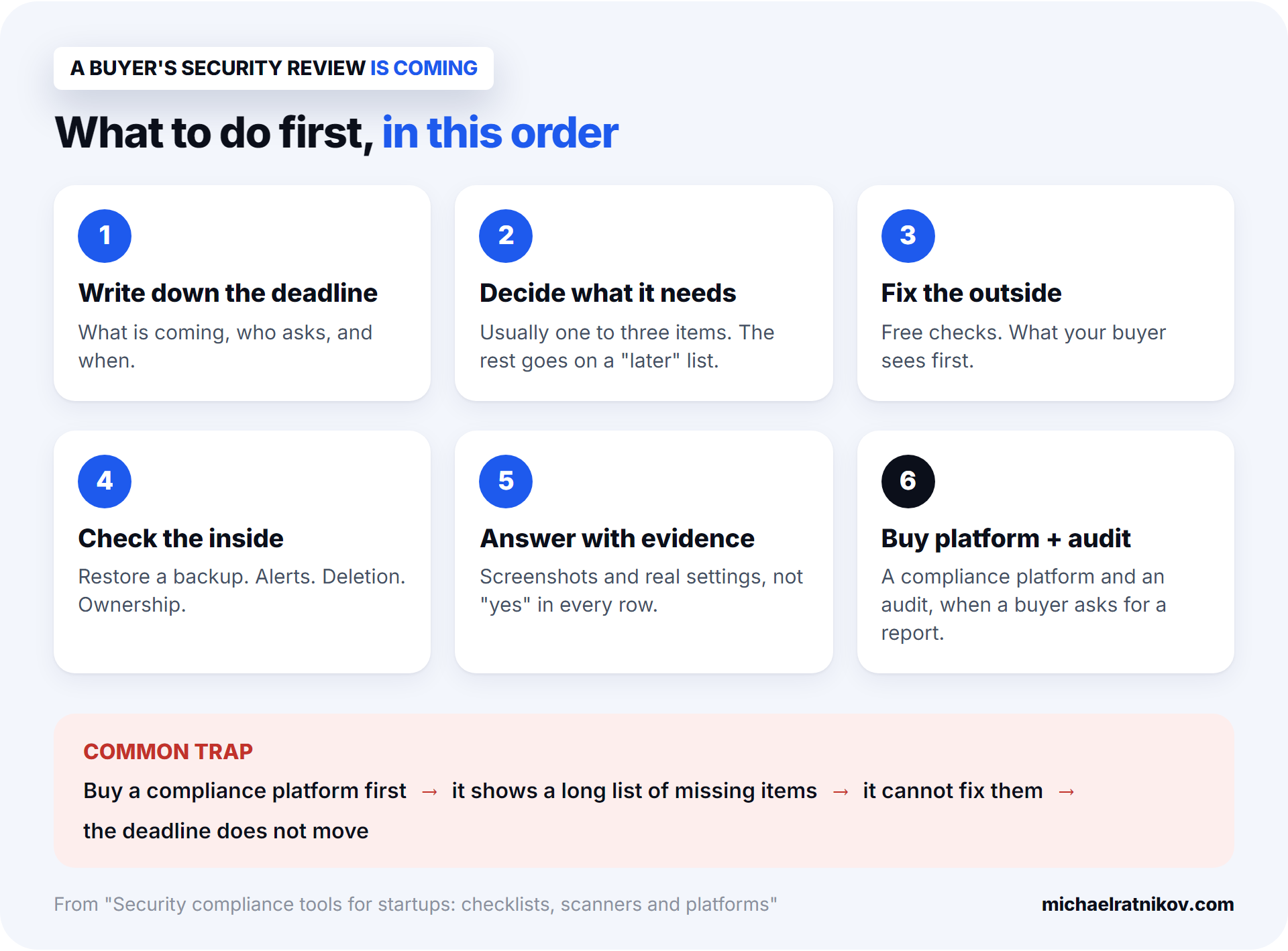
Here is the order I recommend to founders with a deadline coming up.
- Write down the deadline and who is asking. For example: "Security questionnaire from a bank, due in six weeks." Not "we need to get compliant".
- Decide what this deadline needs. Use the table in layer 1. Usually it is one to three items. Put the rest on a "later" list, and write down why.
- Fix what is visible from outside. Run the free layer 3 tools and check your free SecurityScorecard view. Most fixes are small, but test each change before it goes live.
- Check the inside. Restore a backup and time it. Find out who gets the alerts. Delete a test customer and look for what remains. Confirm that you own the code and the accounts.
- Answer the questionnaire with evidence. Attach real screenshots and real settings. Do not just answer "yes" in every row.
- Buy a platform and an audit when a buyer asks for a SOC 2 report or an ISO certificate. By then the big gaps are fixed. The platform then only has to collect evidence.
The opposite order is a common trap. A founder buys the platform first, because its sales team called first. The platform then shows a long list of missing items. The platform cannot fix them, and the deadline does not move.
Footnotes
-
Costbench, Secureframe vs Vanta and Drata vs Secureframe (third-party estimates). https://costbench.com/compare/secureframe-vs-vanta/, https://costbench.com/compare/drata-vs-secureframe/ ↩ ↩2
-
Secure Controls Framework, release 2026.2. https://securecontrolsframework.com/ ↩
-
Cloud Security Alliance, Cloud Controls Matrix v4.1. https://cloudsecurityalliance.org/artifacts/cloud-controls-matrix-v4-1 ↩
-
OpenAlternative, Comp AI vs Probo. https://openalternative.co/compare/comp/vs/probo ↩
-
UpGuard, Pricing. https://www.upguard.com/pricing ↩
-
SecurityScorecard, How do I create a free SecurityScorecard account? https://support.securityscorecard.com/hc/en-us/articles/360059534171-How-do-I-create-a-free-SecurityScorecard-account ↩